

Background Story
Anyone who has tried managing a to-do list knows it rarely stays organized. The process starts with good intentions to capture tasks from emails, meetings, and quick ideas using notes apps, calendars, and checklists. Within minutes, the phone and laptop screens fill with scattered lists, overlapping reminders, and half-finished entries that all feel critical. Each source uses different formats, priorities clash, and due dates shift unexpectedly. What begins as a straightforward daily plan quickly becomes a juggling act between productivity and overwhelm.
The frustration builds as the day goes on. Switching between multiple apps to add, update, or check tasks tests endurance and attention. A single notification pulls you away, forcing you to hunt for where you left off, scrolling endlessly like a disorganized planner. Tasks accumulate across tools, subtasks get lost, and suddenly your schedule exists everywhere but in one unified view. It is a common struggle for product managers and busy professionals trying to stay on top of dynamic workloads.
These daily battles with fragmented lists and slipping focus boil down to five specific pain points. Each one sneaks in gradually, then requires excessive effort to fix. They turn routine task management into an exhausting ordeal that drains time from actual work.
Scattered Task Sources
Tasks emerge from emails, meetings, chats, and spontaneous ideas, forcing constant switching between apps and notes. This fragmentation leads to missed items and duplicated efforts as information stays siloed across tools. Over time, it creates an overwhelming mental load just to gather everything in one place.
Overwhelming Task Volume
Long lists of diverse tasks paralyze decision-making, making it hard to prioritize what matters most amid low-priority noise. Users freeze when facing 20+ items without clear structure, stalling momentum and fostering procrastination. Without smart grouping or limits, the sheer volume turns planning into a daunting chore.
Frequent Context Loss
Distractions like notifications interrupt flow, causing users to lose track of subtasks, due dates, or progress notes upon return. Scrolling back through history or reopening apps wastes minutes per switch, compounding into hours lost daily. This repeated reorientation erodes focus and builds frustration in fast-paced workflows.
Inflexible Scheduling Conflicts
Traditional lists ignore real-life constraints like time blocks, dependencies, or shifting priorities, leading to unrealistic plans that crumble under pressure. Manual adjustments for delays or urgencies create cascading errors, with overdue tasks piling up unchecked. Lack of visual timelines exacerbates poor estimation and adherence.
Absent Progress Insights
Without tracking completion rates, time spent, or patterns in delays, users repeat inefficient habits like overloading days or neglecting reviews. Vague overviews hide bottlenecks, such as recurring unfinished categories, preventing data-driven refinements. This opacity keeps productivity stagnant despite consistent effort.
Now imagine a better way to handle your daily tasks. You start your planning session with focus instead of juggling scattered lists, apps, and reminders fighting for your attention. No more losing momentum while digging through email threads, calendar clashes, or endless subtasks that pull you off track. Focista Schedulo (The To Do List Platform) centralizes all your tasks in one intuitive space while you stay locked into execution. It organizes priorities, surfaces key deadlines conversationally, and highlights conflicts that actually impact your day. Instead of battling disjointed tools, you gain clear visibility to act with confidence.
That is what inspired me to create it. After countless hours wasted switching windows and piecing together context from vague priorities, I built something that truly streamlines task workflows. Focista Schedulo stays simple and powerful, a companion that fits seamlessly into your routine. It turns chaotic list hunting into structured overviews with smart grouping, focus timers, and progress tracking. It is not about endless scrolling through items, but about mastering your schedule with visual timelines, habit insights, and effortless adjustments for real-life changes.
Product Definition
Say hello to the Focista Schedulo platform, a personal project I built to turn chaotic to-do list management from a maze of scattered apps into a clear and focused experience. This intuitive yet powerful tool helps busy professionals capture tasks, set priorities, and visualize schedules conversationally while tracking progress across lists and deadlines. It removes the tedious parts of app-juggling and manual updates so you can focus more on execution and less on list hunting.
The platform is a productivity companion designed to bring structure and clarity to your daily workflows. It allows you to add tasks naturally to a centralized hub of your commitments, monitor priorities with smart grouping, and gain instant insights on conflicts like overlapping deadlines or dependencies. Instead of scrolling through endless notes and calendar windows, Focista Schedulo presents organized overviews in a contextual way that is easy to reference at a glance. Whether you are aligning tasks with time blocks, mapping subtasks for projects, or auditing daily loads, it gives you a clear view of your schedule intricacies throughout your planning process.
By simplifying task entry and visualization, the platform saves you from the repetitive, manual work of piecing together fragmented reminders. It helps you spot bottlenecks in real time, adjust for shifting priorities, and maintain momentum amid distractions. With that awareness, you can plan faster, execute confidently, and tackle your workload without the constant mental overhead. The goal is simple: make task management effortless so that you can spend your energy on meaningful work from the start.
You can check the platform through the following link here
Product Benefits
The Focista Schedulo platform delivers practical benefits that make to-do list management simpler, more structured, and easier to sustain for busy professionals.
- Quick Task Capture: Instantly add daily tasks, subtasks, or ideas from any source to spot priorities and understand how they fit across your schedule like deadlines or dependencies.
- Reliable Progress Tracking: Built for consistency with visual checklists and completion stats, it synthesizes overviews grounded in your actual inputs, eliminating risks of forgotten items or misprioritized efforts.
- Intuitive List Interface: Offers a natural drag-and-drop experience with contextual reminders and progress bars that make organizing feel fluid rather than forced.
- Clear and Visual Overviews: Every list includes direct groupings by category, due date, or status, so you always trace your plan without confusion or overload.
- Reflective Productivity Insights: Helps you identify bottlenecks in habits, recurring delays, and optimization opportunities, enabling smart adjustments before burnout or missed goals.
- Export-Ready Schedules: Generate shareable task summaries or calendars perfect for team syncs, reviews, or personal backups.
- Lightweight and Offline-Capable: Runs smoothly with local storage and no constant syncs, keeping your plans secure and accessible anytime without distractions.
Core Value Proposition
The Focista Schedulo platform offers a single, unified interface designed to make task planning, tracking, and productivity simple and powerful.
- Plan: Dive into customizable task views covering daily lists, projects, subtasks, and calendars with priority tags, due dates, and category filters from your inputs.
- Prioritize: Cross-check workloads against time blocks, dependencies, and energy levels through smart sorting and conflict alerts for balanced schedules.
- Visualize: Access clear progress dashboards with completion stats, timelines, and habit trends, complete with drag-and-drop adjustments and overview summaries.
- Capture: Use the intuitive input to add tasks via natural descriptions. It organizes automatically by context, suggesting groupings and reminders with full transparency.
- Interactive Overviews: Highlight, filter, and connect related tasks using dynamic linking that reveals bottlenecks or overloads instantly.
- Workflow Boost: Leverage built-in templates for daily routines, project sprints, and review checklists aligned with proven productivity methods.
- Smart Guidance: Interact fluidly to reschedule, break down items, and generate motivation summaries tailored to your patterns.
- Share Easily: Export polished lists, progress reports, or calendars with one tap for team handoffs or personal reviews.
Target Audience
The Focista Schedulo platform is built for freelancers, product managers, students, and teams who juggle tasks daily, offering structured, visual tools that organize lists, track progress, and boost execution without app overload.
| Audience | Use Case |
|---|---|
| Busy professionals and freelancers | Quickly list client projects, deadlines, and follow-ups to prioritize high-impact tasks and track billable hours daily. |
| Product managers and teams | Break down sprints into actionable items with dependencies to align efforts, spot bottlenecks, and hit milestones on time. |
| Students and lifelong learners | Schedule study sessions, assignments, and reviews with reminders to maintain focus and crush exam prep steadily. |
| Remote workers and solopreneurs | Centralize personal goals, habits, and errands in one view to balance work-life demands and build routines effortlessly. |
| Small startup founders | Map MVPs, outreach, and operations tasks to stay agile, review weekly progress, and scale without chaos. |
Key Features
The Focista Schedulo platform centers on intuitive task browsing, smart organization, and seamless progress tracking to simplify daily planning for individuals and teams.
Task Dashboard
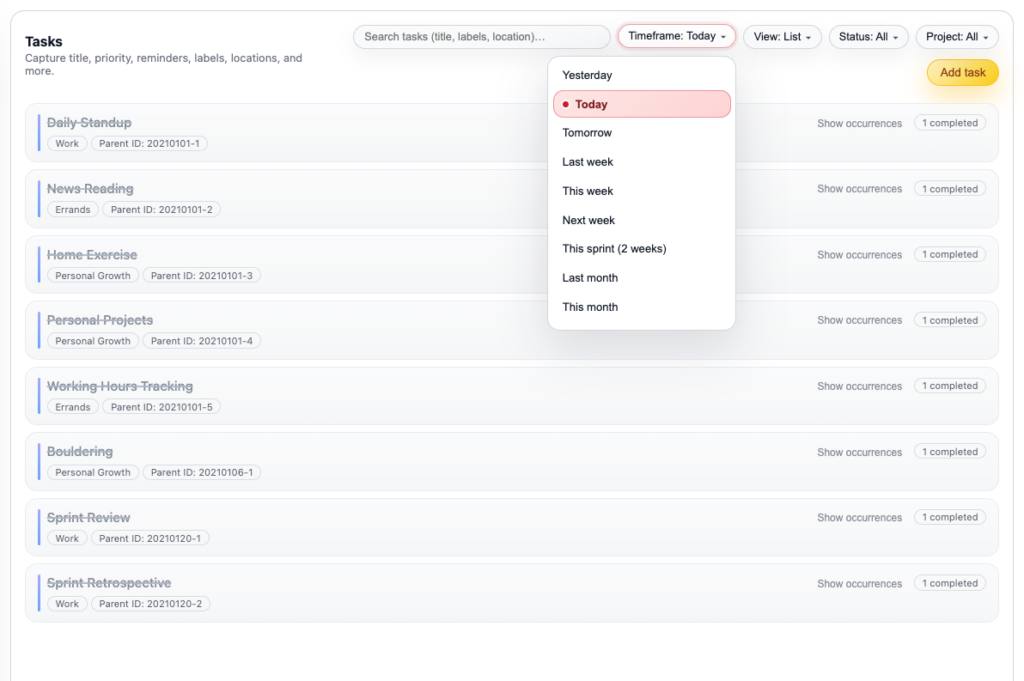
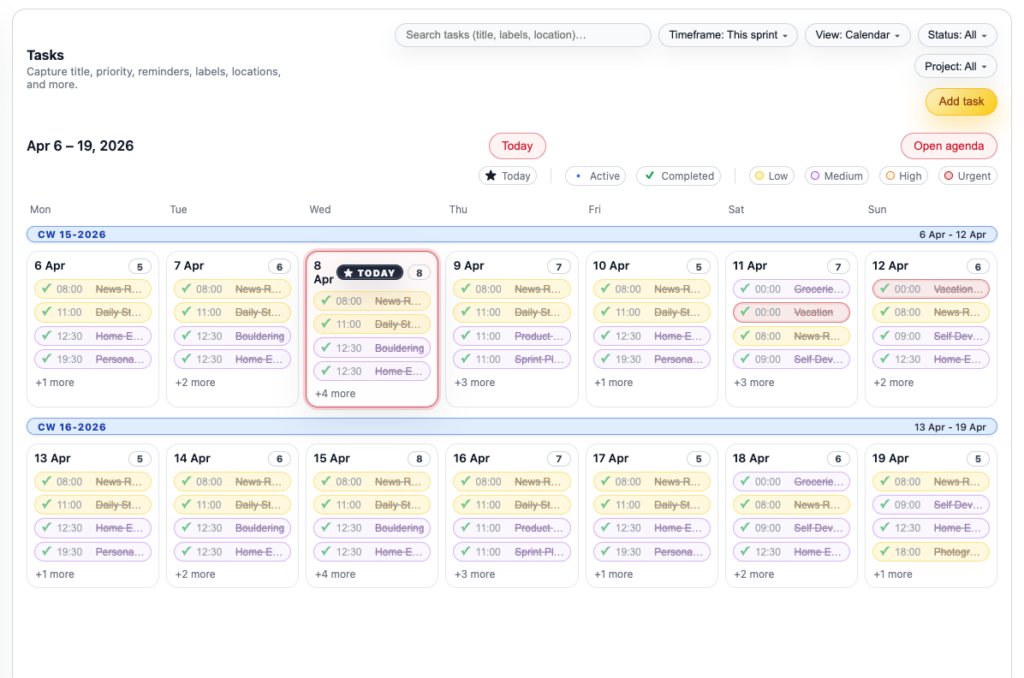
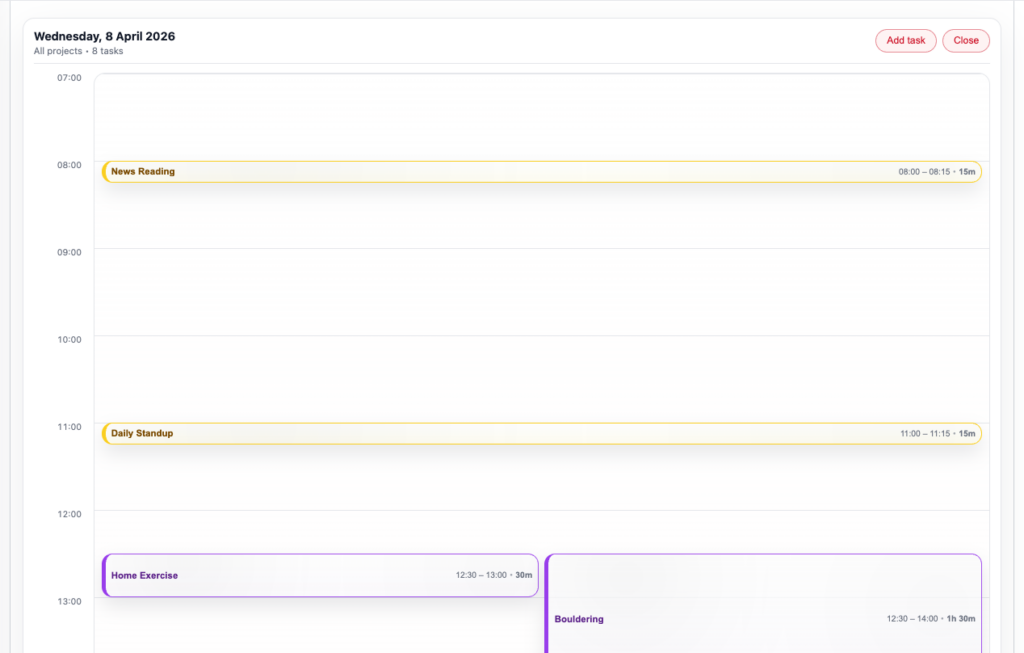
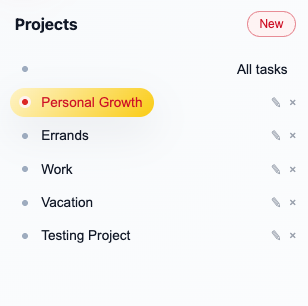
Your central command center starts on the homepage, showing active lists, today’s top priorities, and upcoming deadlines in a glanceable layout. Tap the logo to reset anytime, with prompts for quick list creation or task adds. It clears views for fresh starts, labeling sections like “Today,” “Upcoming,” and “Projects” with titles, dates, and bars tracking progress. Prefixes aid fast scans, eliminating clutter.
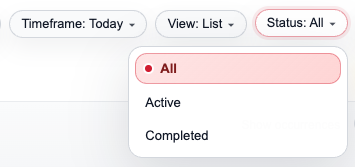
Filters cover Category (work, personal, habits), Priority (high, medium, low), Due Date ranges, and Status (open, in-progress, done). Dynamic updates narrow options, such as work-only in “Today,” using stacks on mobile or grids on desktop. “Clear all” resets with one tap. Tasks appear as expandable cards revealing notes, checklists, and subtasks, grouped under headers like “High Priority (5 items)” with live counts and summaries pulled from your data.
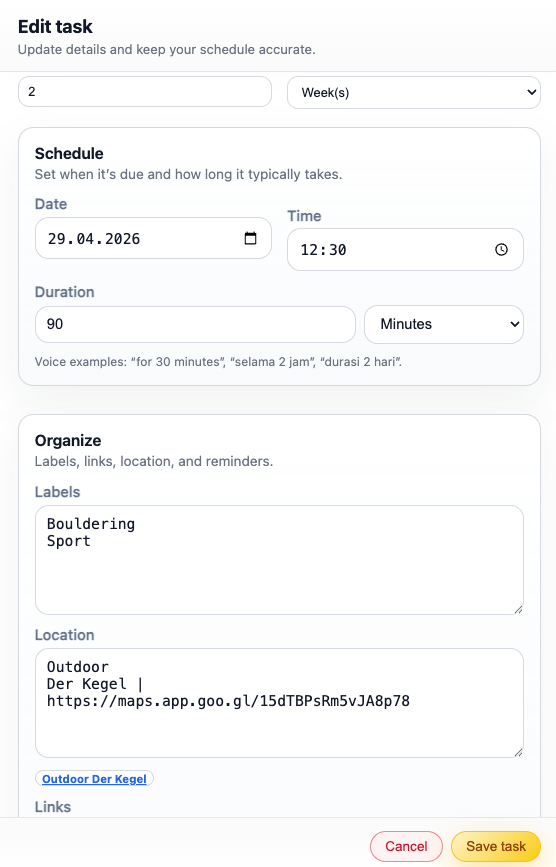
Details include task headers, edit icons, position trackers (ex: “Task 3 of 15”), and number jumps. Export options save to PDF, CSV, or calendar formats; “Back to dashboard” navigates smoothly. Side panels link subtasks or dependencies for inline edits, keeping everything connected and actionable.
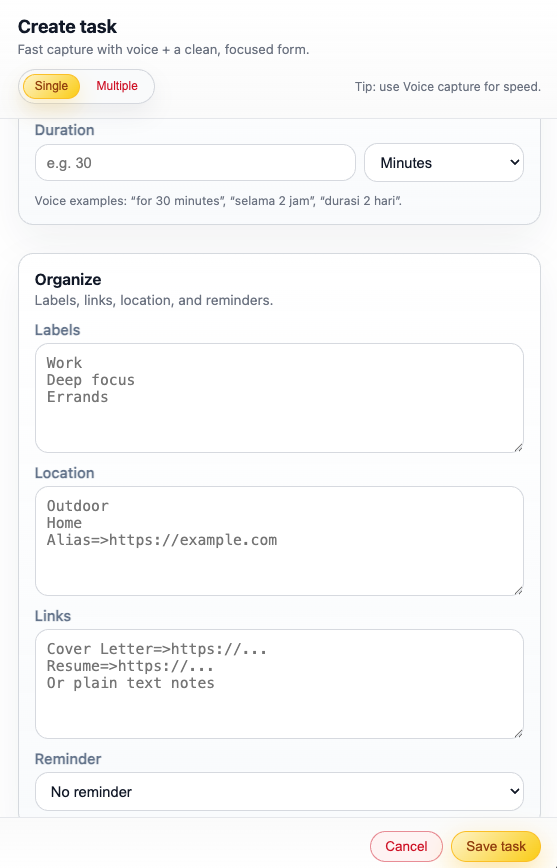
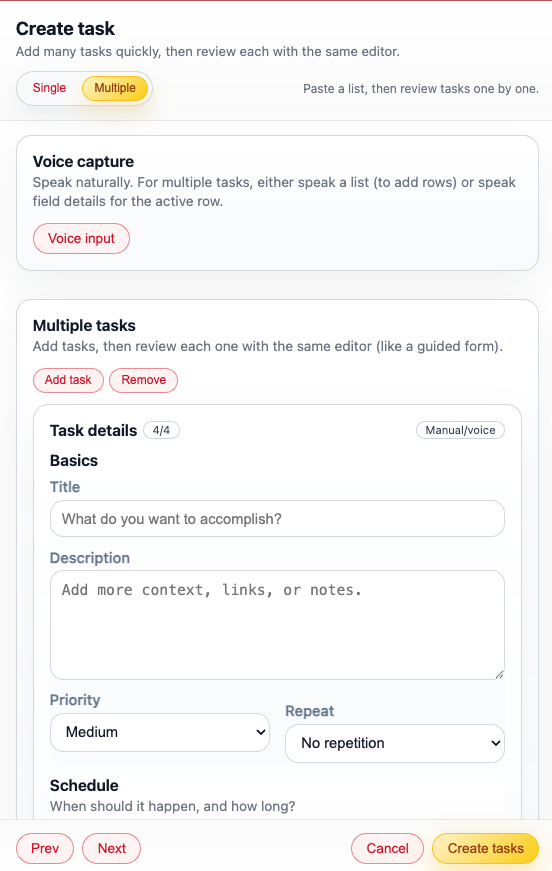
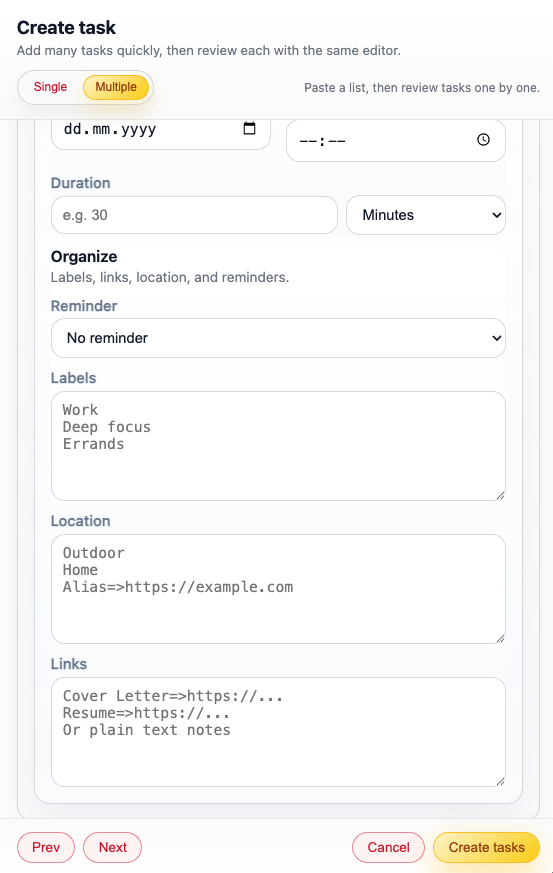
Quick Task Entry
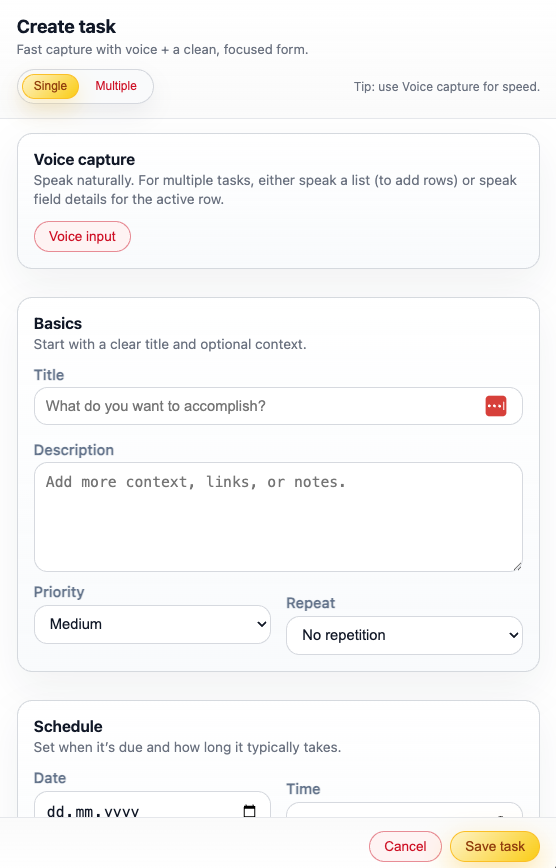
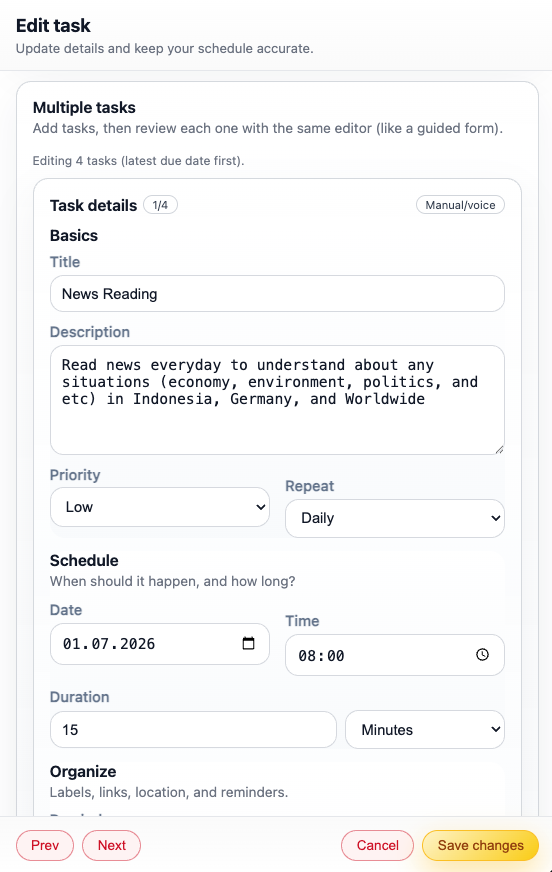
Add tasks effortlessly through a free-text bar at the top, typing entries like “Finish quarterly report by Friday” or “Gym 30min session.” Submit via button or Enter to auto-parse priority, due dates, and recurring patterns. Smart suggestions propose categories (ex: “Fitness”) and reminders based on keywords and history. Basic matching handles simple cases reliably.
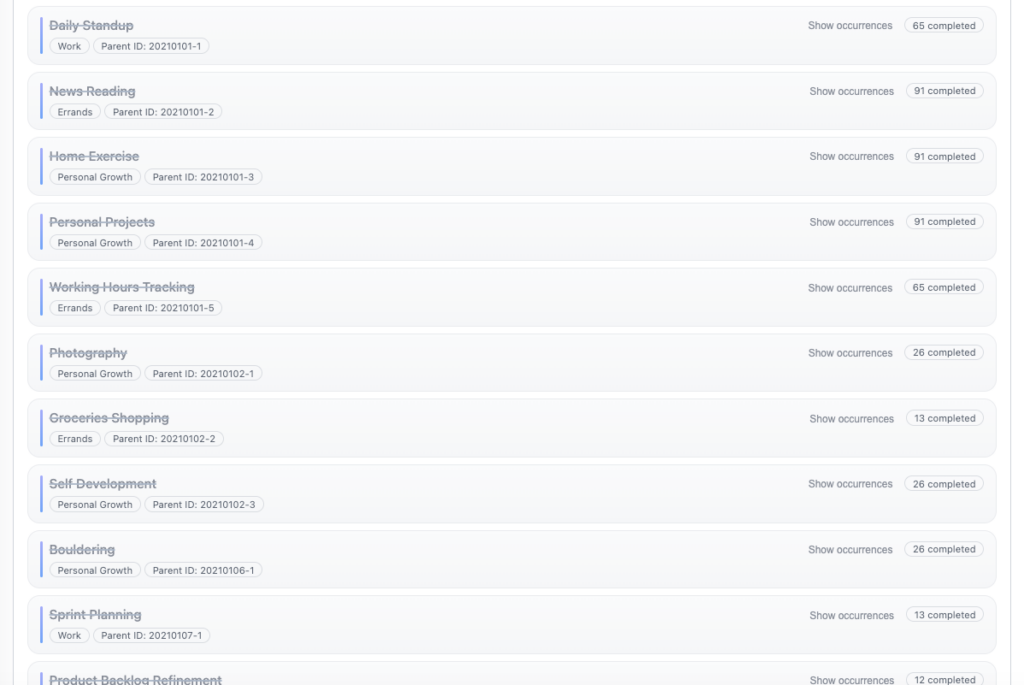
Panels organize new items with visual chips: completed ones strike out, overdue glow red, in-progress show timers. Related task lists link for context, refreshing views on adds to maintain sharp focus without reloads. Recurring setups like “Weekly team sync” repeat intelligently, reducing repeat entry.
Advanced Filtering and Search
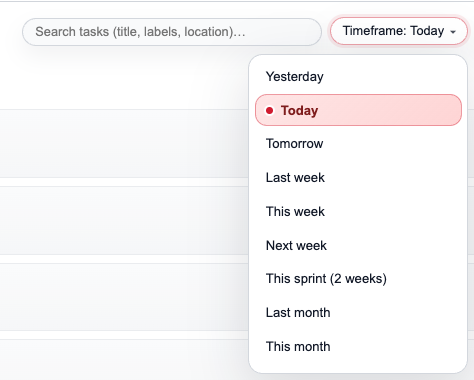
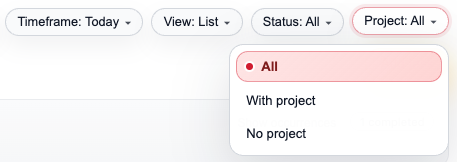
Powerful filters and search refine your view instantly. Combine category, priority, date, assignee (for teams), and custom tags to surface exactly what you need, like “High priority work tasks due this week.” Live updates prevent overload, with presets for “Today Only” or “Overdue.” Search scans titles, notes, and tags for fuzzy matches.
Saved filter views let you pin favorites like “Client Projects,” applying across sessions. Mobile gestures swipe to filter, desktop uses dropdowns. This turns massive lists into focused workspaces, saving time on hunts.
Progress Analytics
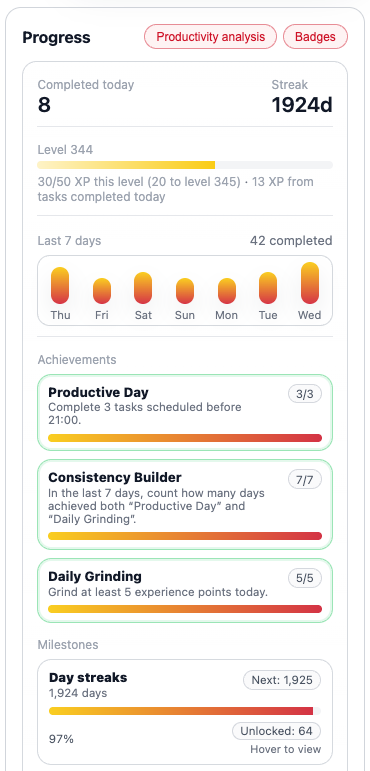
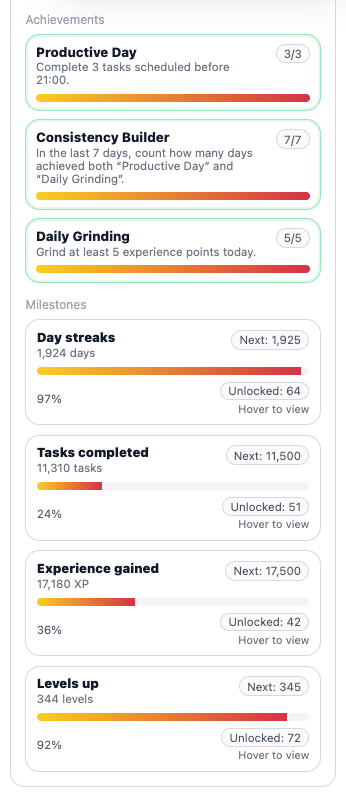
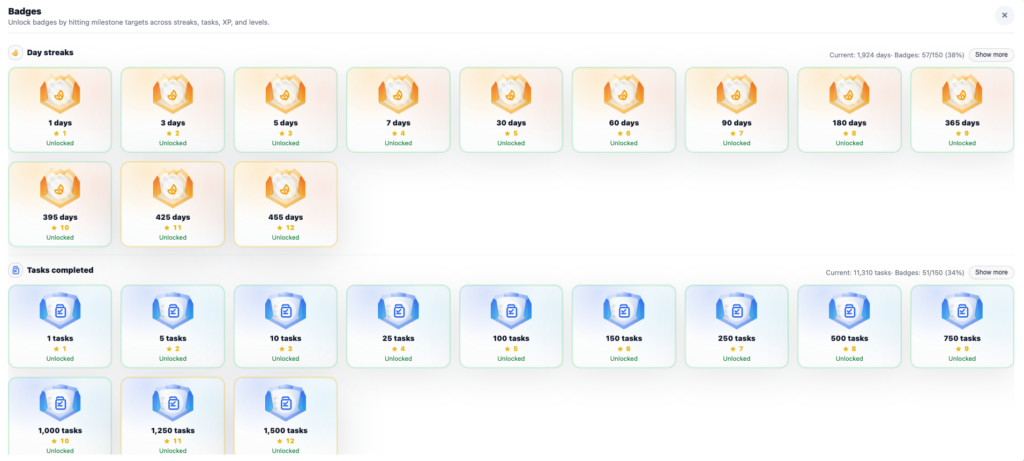
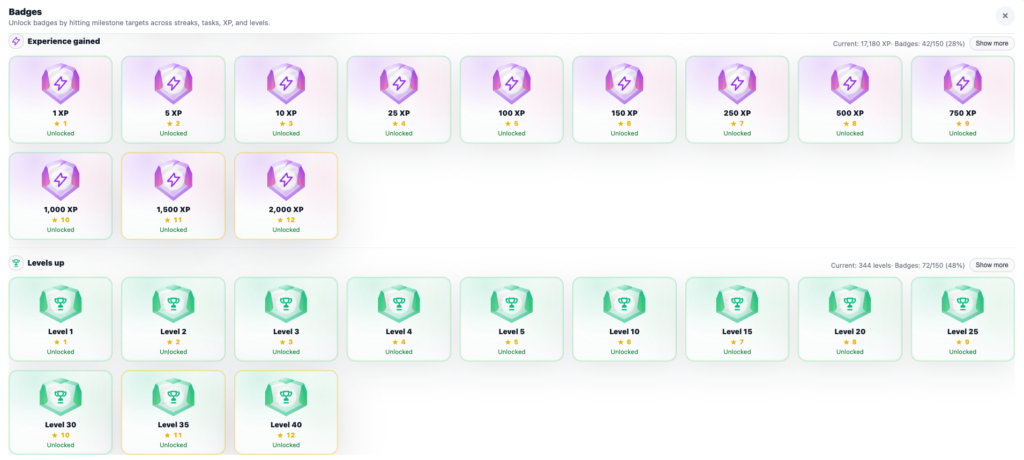
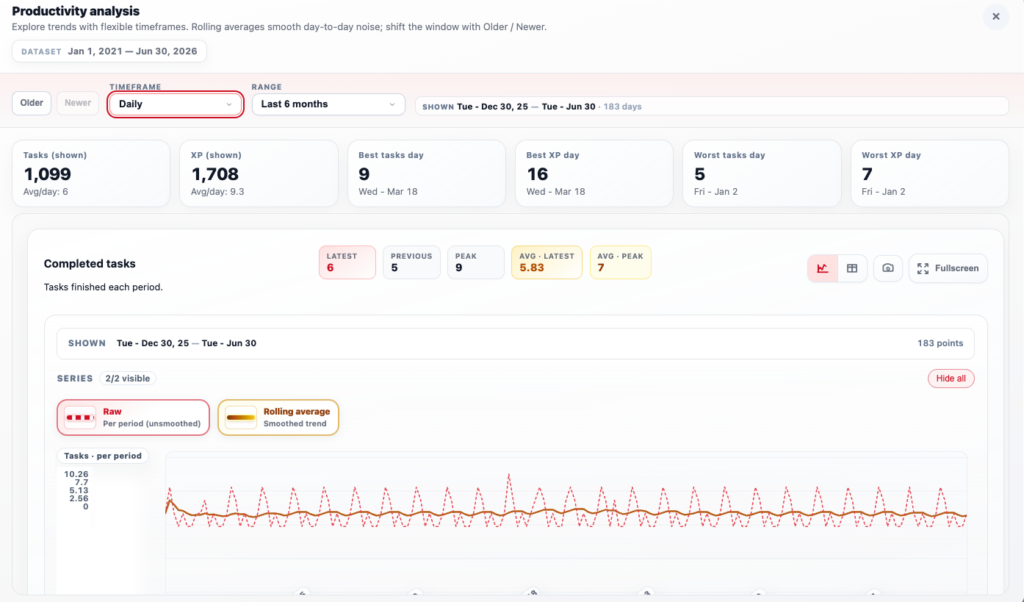
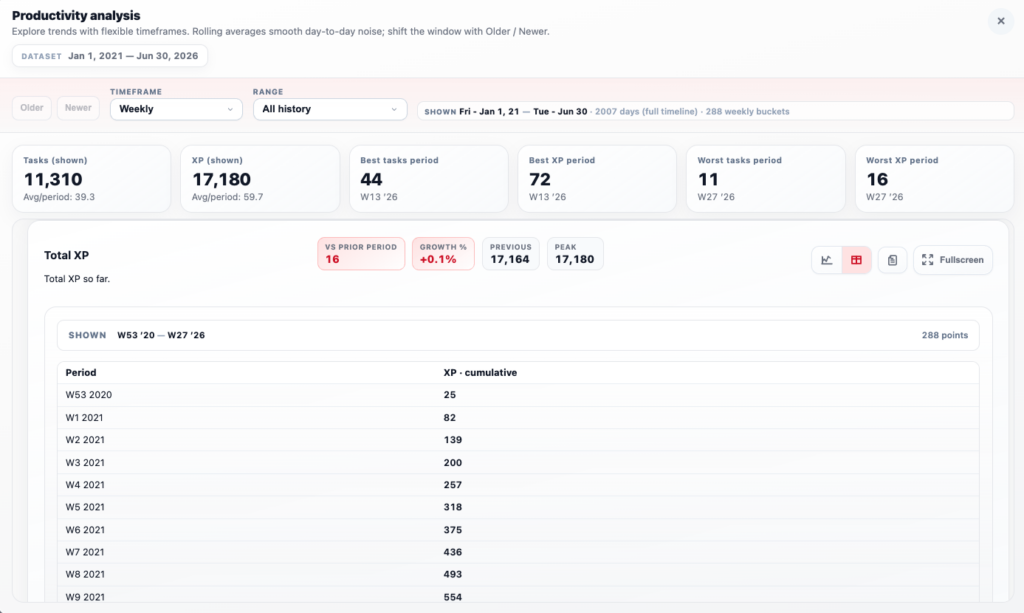
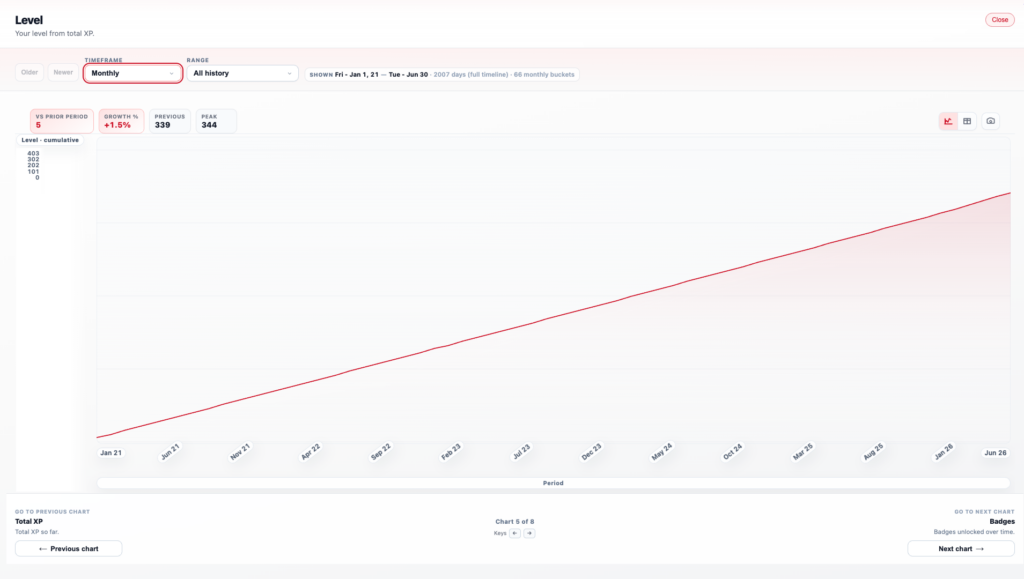
The dedicated Progress tab analyzes trends with charts for weekly completion rates, average task times, and streak counters from your history. Cards detail stats like “85% done this week” with breakdowns by category (work 90%, personal 70%). Tags categorize insights (“Productive Days,” “Habit Wins”), pulling data dynamically.
Date-range sliders and type filters (daily/weekly/monthly) update charts live; “Refresh” syncs latest. Visuals include pie charts for categories, line graphs for streaks, and tips like “Your focus peaks mid-morning.” Export reports for reviews, cutting manual logging for real pattern insights.
Schedule Sync and Reminders
Sync keeps tasks updated across devices with one-tap refresh, reindexing changes and pushing views live. Auto-sync runs in background or daily at set times (e.g., 8 AM), handling offline edits seamlessly upon reconnect. Cloud or local options ensure reliability.
Reminders ping via notifications for starts, dues, or overdue, customizable by type (sound, vibrate). Cross-device consistency means adds on phone reflect on desktop instantly, with conflict resolution for edits.
Insights and Habit Builder
Insights tab delivers personalized tips from data, like “Batch low-energy tasks post-lunch” or “Shorten meetings by 15%.” Cards summarize trends, link to tasks, and tag issues (“Overload Alert”). Filters by focus area refresh for new data.
Habit summaries auto-generate overviews, ex: “3-week streak on reading,” with goal setters for new routines. Grounded in logs, it motivates with progress visuals and gentle nudges, turning data into actionable growth.
Documentation & Sources
The Focista Schedulo platform is thoroughly documented in its GitHub repository, which provides clear explanations of the platform’s logic, data structure, core features, and task handling as well as links to relevant references and dependencies.
Product Documents
The documentation in the GitHub repository covers several key areas of the platform.
Architecture
This document outlines the data flow, component boundaries, and technical architecture of Focista Schedulo. It aligns with the Product Documentation Standard and supports engineering onboarding as well as feature-to-code mapping for Dashboard, Task Entry, and sync pipelines. It complements the tech stack and guidelines described in the README and PRD, using professional wording for clarity and easy reference.
View Architecture Documentation →
Product Metrics & OKRs
This document defines how the Focista Schedulo platform measures success and how those metrics align with both product and engineering goals. It follows the Product Documentation Standard and covers engagement indicators, feature-level metrics, and OKR alignment. For application data metrics such as task completion rates, streak lengths, or productivity scores, see PRODUCT_METRICS.md. For all variables across data, configuration, and storage files, refer to VARIABLES.md.
View Metrics and OKRs Documentation →
Product Requirements Document (PRD)
The PRD serves as the single source of truth for all product requirements for the Focista Schedulo platform. It includes the product overview, productivity pain points, goals, scope, and detailed feature descriptions for modules such as Task Dashboard, Add Tasks, Progress Analytics, Sync, Insights, and Reminders. It also covers data processing rules, non-functional requirements, and business and technical guidelines that shape how the platform organizes, tracks, and visualizes tasks.
View PRD →
Product Documentation Standard
This document defines the professional documentation standards followed across the Focista Schedulo platform. Every file includes sections such as product overview, benefits, features, logic, business and technical guidelines, and tech stack details. The goal is to maintain consistency, clarity, and a single source of truth for anyone who reads, extends, or contributes to task management features.
View Product Documentation Standard →
Product Metrics Documentation
This resource provides a comprehensive reference for all productivity metrics in the Focista Schedulo platform. It explains how metrics feed the dashboard, outlines categories like completion trends and habit stats, and defines indicator details including IDs, labels, units, formulas, fallbacks, and calculation logic. It also sets data quality rules to support product, design, and engineering consistency.
View Product Metrics Documentation →
User Personas
This document describes the primary users of the Focista Schedulo platform, outlining their roles, task challenges, goals, and success metrics when managing schedules. It guides feature prioritization and informs user stories, helping align platform behavior with real workflows for freelancers, managers, students, and teams. Each persona reflects benefits such as quick entry, visual tracking, and reminder reliability.
View User Personas →
User Stories
User stories are grouped by feature area (Dashboard, Entry, Analytics, Sync, Insights) and mapped to the personas defined in productivity documentation. Each story includes clear acceptance criteria and follows the Product Documentation Standard to ensure product logic, behavior, and testability remain consistent and easy to trace. This structure keeps the platform focused on practical task use cases.
View User Stories →
Variables Documentation
This document serves as the single reference for all variables used in the Focista Schedulo platform. It lists each variable’s name, friendly name, definition, default value, and usage context, along with practical examples. It also describes how variables relate to one another and how data flows from inputs to tracked lists, helping maintain clarity across product, design, and engineering considerations.
View Variables Documentation →
Tech Stacks
The Focista Schedulo platform relies on a lightweight, open-source technology stack optimized for smooth task handling, real-time updates, and offline access without heavy dependencies.
- HTML5 forms the backbone of the frontend interface, structuring sections like Dashboard, Task Entry, Progress, and Insights for accessible lists, responsive cards (task items, filter bars), and detail panels with controls like edit buttons and export links.
- Vanilla JavaScript (client-side) and Node.js (server-side, if extended) drive interactions: frontend manages filter updates, progress bars, quick adds, drag-and-drop sorting, and UI syncs after saves; backend supports data persistence, search, and sync APIs for lists and reminders.
- CSS (vanilla with media queries) styles the simple, focused layout. Grid lists for tasks, clean headers, expandable subtasks, status badges, and mobile-optimized filters prioritize usability across screens without distractions.
- Local JSON storage (tasks.json, progress.json) and browser APIs like IndexedDB or LocalStorage hold normalized data for tasks, lists, stats, and reminders, enabling instant offline use with auto-sync on reconnect.
- GitHub repository centralizes version control, README setup (npm install, npm run dev), docs (PRD.md, METRICS.md), source code (app.js, task-manager.js, sync.js), and issues for easy contributions and reviews.
Use Cases
The Focista Schedulo platform is built to cover several practical use cases and scenarios such as
Capture and Prioritize Daily Tasks
As a Busy Professional, I want to quickly add tasks from emails or ideas with auto-priorities, so that I focus on what matters most right away.
Acceptance Criteria:
Browse and Filter Task Lists
As a Product Manager, I want to navigate lists, projects, and overdue items with filters, so that I locate specifics fast without scrolling endlessly.
Acceptance Criteria:
- Filter bar handles Category (work/personal), Priority, Due Date, and Status with live updates.
- Detail view offers edit, subtask adds, and export to calendar.
- Related tasks load as linked panels automatically.
Track Progress and Analytics
As a Freelancer, I want to see completion trends and streaks, so that I measure productivity and adjust habits weekly.
Acceptance Criteria:
- Progress tab displays charts for rates, times, and categories.
- Filters by date/type refresh data on demand.
- Export reports for client reviews or personal logs.
Sync Across Devices
As a Remote Worker, I want tasks to update seamlessly on phone and laptop, so that nothing falls through during transitions.
Acceptance Criteria:
Get Insights and Reminders
As a Student, I want personalized tips and notifications, so that I stay motivated and avoid forgetting key items.
Acceptance Criteria:
- Insights tab generates advice from patterns like “Batch routines.”
- Custom reminders ping for starts/dues with sounds.
- Tags filter tips by focus area like “Study” or “Health.”
Organize Recurring Habits
As a Team Lead, I want repeating tasks like weekly meetings auto-managed, so that routines run without manual re-entry.
Acceptance Criteria
Why I Built the App
The idea to build the Focista Schedulo platform stemmed from endless frustration with fragmented task management that derailed focus during hectic days. As a freelancer coordinating client deadlines alongside personal errands, or a student balancing assignments with part-time shifts, I kept running into the same chaos: quick ideas from voice memos clashed with calendar alerts, Slack pings turned into forgotten follow-ups, and grocery lists battled work sprints across phone apps, desktop tools, and scribbled paper. This nonstop toggling transformed routine planning into stressful scrambles, where tracking “prep for 2pm client demo” or “hit the gym before dinner” required piecing together mental notes from yesterday, wasting energy on duplicates or overlooked subtasks.
My drive for simple, visual productivity pushed me to craft a unified platform that pulls everything into one intuitive hub. I sought to remove the hassle of scattered inputs while making progress obvious at a glance. Focista Schedulo achieves this through its central dashboard for daily snapshots, effortless task capture from any source, smart filters to cut noise, cross-device sync for reliability, habit analytics to spot patterns, and timely nudges to keep momentum. Users facing packed schedules gain control without tool overload, shifting from disjointed lists to streamlined flow that fuels consistent wins.
What I Learnt from the App Development
The biggest takeaway from building Focista Schedulo hit me when I started using it as my own toughest critic, just like testing a startup idea on myself during crunch weeks. Late nights coding meant staring down my actual daily messes: flipping between Google Keep for grocery runs, Trello for freelance gigs, and Notion for study notes, all to chase down “debug app crash before demo” or “meal prep for the week.” When dashboard filters tripped me up in testing or progress charts hid my real streaks, the next morning’s rush hit hard with overwhelming lists and zero motivation, making me rethink why drag-and-drop felt stiff or reminders stayed silent. This raw self-use turned tweaks to task cards, priority colors, and sync speed into real lessons in understanding chaos, where my packed freelance-student life judged every pixel’s worth.
The project hammered home that true simplicity demands brutal cuts in product building. Right when quick task entry flowed smoothly and analytics lit up habit gaps, shiny ideas like AI priority guesses or team collab popped up to muddy the waters. Real focus stuck to basics: one dashboard for all views, filters that snap into place, and offline-ready storage. Rejecting extras kept the add bar lightning-fast for voice notes on the go, locked detail screens to essential edits without fluff, and made insights a quick glance at “why mornings fail.” Each “no” sharpened it for genuine use, proving less gear creates apps you grab first thing, not just demo well.
In the end, development taught me discipline trumps every shortcut for meaningful impact. Prototyping flew through list sorting and reminder logic, but calls on visual timelines, streak counters, and mobile gestures came from surviving my own schedule nightmares across remote work sprints and exam crams. Past habits favored glanceable charts over tweakable menus, user needs killed overkill, and practical choices picked local JSON for speed over cloud fuss for reliability. Focista Schedulo shows winning apps fuse quick builds with tough priorities, channeling fast experiments into fixes for everyday list overload that busy solopreneurs, team leads, and goal-chasers actually stick with.